
Scan to BIM Services in Comanche, Texas
Comanche LiDAR to Revit for Existing-Condition Documentation
A Scan to BIM project in Comanche converts measured visible conditions into a registered point cloud and a coordinated building model for design, renovation, construction coordination, or facilities work. AeroFrohne produces scope-specific Revit, IFC, E57, and DWG deliverables.
AeroFrohne is headquartered in Corpus Christi and coordinates project-specific field capture for Comanche, Texas based on site access, scope, technician availability, and schedule. Before capture, define the model elements, target LOD, software version, required tolerance or control, output formats, and acceptance criteria. A scanner specification alone is not a survey-grade accuracy guarantee.
- Comanche project coverage is confirmed for each address, scope, and schedule.
- Typical deliverables include Revit models (.RVT), IFC exports, registered E57 point clouds, and 2D CAD drawings (.DWG).
- Common uses include renovation, adaptive reuse, MEP coordination, construction planning, and facilities documentation.
Scan to BIM service · Scan to BIM location directory · Scan to CAD · Matterport Pro3 deliverables guide
Matterport Pro3 Capture for Comanche Projects
Matterport Pro3 can capture spatial data indoors and outdoors for existing-condition documentation. Project accuracy depends on the capture plan, registration, control, site conditions, and agreed modeling tolerance; those requirements are confirmed separately for each scope.
What does a Scan to BIM project in Comanche include?
The exact scope is agreed before mobilization. A typical Comanche project combines field capture, registered point-cloud data, model production, and quality-control review so the project team receives usable existing-condition files.
Field capture and registration
Plan access, capture visible conditions, register scan positions, review alignment, and prepare the point cloud for downstream modeling.
Revit and IFC modeling
Model the agreed architectural, structural, and visible MEP elements to the selected LOD and required software version.
Point-cloud and CAD outputs
Request registered E57 data, native RVT files, IFC coordination models, or DWG plans, elevations, and sections as the scope requires.
Quote and acceptance inputs
Provide the address, area, levels, target spaces, deliverables, LOD, software version, access limits, required tolerance or control, and deadline.
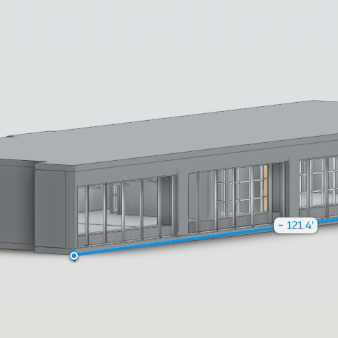
Explore the RVT Model in 3D
Comanche Scan to BIM examples
3D Scan to BIM
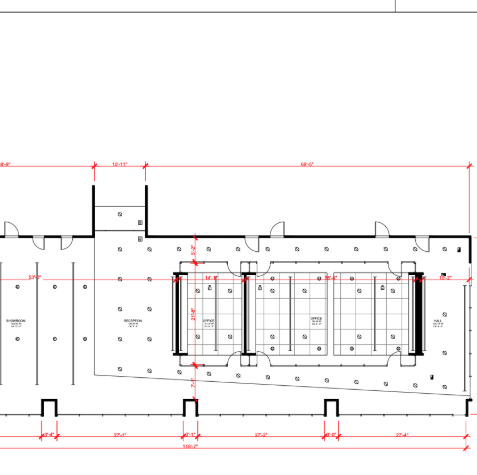
3D Scan to CAD
Comanche Scan to BIM deliverables
Revit Models (.RVT)
Intelligent 3D models of existing conditions. We model architecture, structure, and exposed MEP to your specified Revit version.
E57 Point Cloud
High density, registered point cloud files usable in Revit, Navisworks, Recap, and other BIM software for your own modeling teams.
2D CAD (.DWG)
Floor plans, reflected ceiling plans (RCP), and elevations extracted directly from the 3D data for traditional CAD workflows.
IFC Exports
Industry Foundation Classes (IFC) exports for OpenBIM compatibility, ensuring data works across ArchiCAD, Vectorworks, and more.
LOD Specification
We tailor the geometry to your needs: LOD 200 (generic massing) to LOD 300 (architectural and structural precision).
MatterPak™ Bundle
Includes .XYZ point cloud, .OBJ mesh file, and floor plan images for quick visualization alongside the heavy BIM data.
Where Comanche Scan to BIM fits
Commercial offices and campuses
Document existing walls, openings, floor levels, ceilings, and visible MEP before tenant improvements, renovations, or space-planning work.
- Existing-condition models
- Tenant improvement backgrounds
- Facility documentation
Industrial and production facilities
Capture accessible equipment rooms, production support spaces, visible piping, structural elements, and facility layouts for planned modifications.
- Brownfield documentation
- Visible MEP coordination
- Shutdown and retrofit planning
Healthcare, education, and public buildings
Plan phased capture for occupied facilities where room lists, access windows, escorts, privacy, and restricted areas must be defined in advance.
- Renovation backgrounds
- Campus and facility records
- Phased-access planning
Architects, engineers, and contractors
Use registered point clouds and coordinated model geometry to reduce return visits and give project teams a common existing-condition reference.
- Pre-construction planning
- Design and clash coordination
- As-built documentation
Scan to BIM workflow
1) Confirm the project scope
Confirm the address, access, target spaces, model elements, deliverables, LOD, software version, control or tolerance requirements, and acceptance criteria.
2) Capture and register
Coordinate qualified field capture for the approved schedule, register scan positions, review alignment, and prepare the point cloud.
3) Model to the agreement
Build only the agreed visible or accessible elements and document exclusions, assumptions, and requested file formats.
4) Review and deliver
Review the model against the registered point cloud and deliver the agreed native and exchange files with project notes.
Comanche Scan to BIM FAQ
How is field capture coordinated for a project in Comanche?
AeroFrohne is headquartered in Corpus Christi. For requests in Comanche, field coverage and technician availability are confirmed for the specific address, scope, access window, and schedule; this page does not represent a staffed local office.
What information is needed for a Scan to BIM quote?
Provide the site address, approximate area, number of levels, building use, target spaces, access constraints, desired deliverables, LOD, software version, tolerance or control requirements, and deadline.
What Level of Development (LOD) is available?
LOD 200 or LOD 300 may be appropriate depending on the project. The proposal defines the modeled elements, visible or accessible conditions, exclusions, and required tolerance instead of treating LOD as an accuracy guarantee.
Which Scan to BIM deliverables can be requested?
Depending on the agreed scope, deliverables can include native Revit files, IFC models, registered E57 point clouds, and DWG plans, elevations, or sections.
Does Matterport Pro3 capture guarantee survey-grade accuracy?
No. Device specifications are not a survey-grade project guarantee. If the work requires survey control, a stated tolerance, a coordinate reference system, or licensed surveying, identify that requirement before capture so it can be scoped separately.